If you haven't heard yet, you've probably been under a rock since Thursday, but openSUSE 11.2 was released with KDE 4.3.1 as the default desktop.
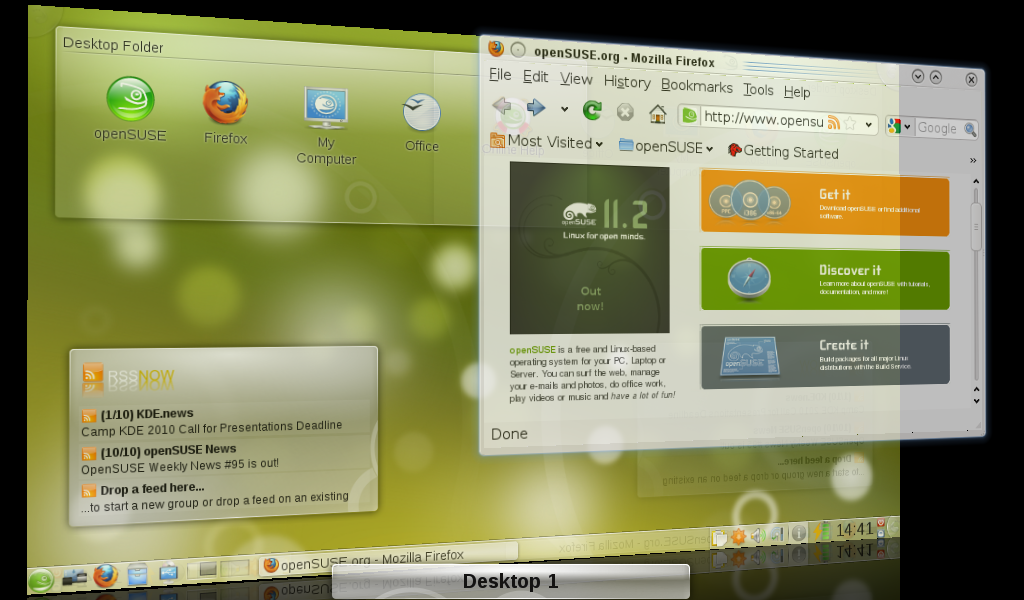
openSUSE 11.2 KDE on a Intel 945GM netbook
As well as all the features KDE 4.3 brings, the openSUSE team and community have worked hard to improve integration with frequently-used non-KDE apps such as Mozilla Firefox and OpenOffice.
Netbook and notebook users will like the new KDE 4 KNetworkManager and improved KDE RandR support for external monitors, and sensible defaults like automatically enabled Desktop Effects and opt-in indexing for desktop search make for a good out-of-the-box experience.
As usual, openSUSE 11.2 has the YaST do-it-all configuration tool, now completely ported to Qt 4, and KDE users will benefit from the new Desktop kernel, tweaked for desktop performance.
Comments
I did a comparison this weekend of openSUSE 11.2, KBuntu 9.10, and Ubuntu 9.10.
I am sad to say that I preferred the Ubuntu version of Linux. I have been a KDE fanboy for some time, my first experience was in the 2.x era, with a lot of use in 3.x era. I've been holding off on 4.x until it gets a bit more "mature". I think the upcoming 4.4 release will be "it". I am a professional Qt developer and like what KDE/Qt have to offer. But I am sadly disappointed by a number of design decisions KDE has made lately.
For instance, what use is it to rotate a plasmoid? Sure its nifty, but who will ever do it? The desktop is suffering from over-inventiveness and eye-clutter and not focusing on user-experience. And if KDE is to ever become adopted, it will have to go through a significant polish phase. Other problems I had was were things did not lay themselves out right. Simple things like QLabels were cut-off, I had to resize the dialog to read all the text. All around I found things just unpolished, not what I've come to expect. I have to say trying both KDE distros was very disappointing. Another problem I had was NeworkManager was not showing me how I was getting internet access. I eventually figured it out, but not having any devices listed was not right. I found the plasmoid side-bar (Size, rotate, close) to be un polished, and waste space. Given that users are familiar with the title bar concept, which has minimize/restore/maximize, and people all know you can resize at any corner, (on any GUI) providing an additional button for this infrequent action is silly. Also, who rotates windows? Not a single GUI has ever had a use case for that! And finally close. Close should be where everyone expects it to be, in the top-right. Not bottom right. The whole bar is a solution to a problem that shouldn't exist in the first place. I understand the need for a titlebar-less app, but the popup bar should be identical to the one we have (Horizontal, app title, close button the the right) just hide it unless the mouse enters the window.
KBuntu was my favorite of the two, simply because its package management system was better. OpenSUSE gave me a technical laundry list of things to install (I was trying to install gcc/++/make) and compile the VMWare tools. But I never succeeded because I couldn't locate the proper kernel source.
Both KDE's had things that crashed out-of-the-box.
Meanwhile, my GNOME experience of Ubuntu was much better. Nothign crashed, all dialogs were propery laid out. They may not add as many features per release, but damn if it isn't polished. Until KDE brings itself back into the fold, I am recommending (and using) Ubuntu. Which is a complete shame, because KDE is technically superior IMHO, its just that the technology is not being leveraged correctly.
Also, I think Amarok should be able to use DLNA sources for media sources. Given that I've gotten used to using DLNA for my PS3, Amarok should be able to access my TwonkyMedia server.
there is some work being done on upnp kioslaves to allow KDE apps to browse/export shares, including amarok.
I agree with a lot of what you said. I think KDE itself is quite good already, it's more a problem of the distributions right now. I am sorry, but openSUSE's package management and configuration stuff is a mess in my opinion. Give me a Debian, Ubuntu or Archlinux instead any day of the week. Kubuntu is the closest to what I am really looking for, very well upstream-only without shit custom themes and shit custom configuration tools (mostly). However, Kubuntu's KDE desktop seems less stable and not as fast as let's say sidux (Debian/sid) or openSUSE for some reason and the tools ported over from Ubuntu are not completely polished. Ubuntu (GNOME) is the "best" experience right now, while I think KDE is the "best" desktop environment right now. So hurry up Kubuntu, with Project Timelord!
If you love Buntu then stick to it and be happy. No need to come here and bash KDE for rotating icons. That just shows that you don't have an argument. Gnome apps don't crash? More power to you!
KDE is different from the rest and that is good so. There are a lot of KDE users out there who love this DE and the direction it's heading - innovation.
I am happy that KDE 4 is not a copy of another DE out there like you would like it to be, saying that there is no GUI out there that does this or that apart from KDE. At least that should be good news for the KDE devs, and a proof that KDE is unique. Ha, not even Apple does it the way the KDE guys do!
I would say that Linux is all about choice so if you don't like KDE then use Gnome, Xfce, IceWM or whatever. As long as it's running on Linux you are my friend :)
In fact, most of KDE is quite polished. And the OpenSuse KDE really shines with OpenOffice and Firefox integration. From my POV e.g. gnome just feels like a cluttered mishmash of separate apps whereas KDE is more unique. Gnome is good as a desktop and compares decently with Windows, it's just that only KDE gives the impression, that a "cool" idea is the driving force behind it. Simply inspiring... and it looks good ;-)
Well I am glad you are my friend, but...
Its ok to be different, if you have a reason to be different. But KDE is different for no other reason than being different. Innovation at a fundamental level has a reason. Innovation is always some way better. It'll provide some value to the user.
And the rotating thing, can you come up with a legitimate reason why anyone want my windows rotated 45 degrees? How is that 'better'? What value does that provide the user?
If no other desktop does it, don't you think they have a good reason that they *don't* do it?
If you continue to bury negative comments, you won't wind up the a DE that people *want* to use.
What are the windows you are supposedly rotating?
As far as I can tell, kwin does not support rotating of windows even with compositing. Making KDE just like every other desktop in that regard.
"can you come up with a legitimate reason why anyone want my windows rotated 45 degrees?"
first, they aren't windows. disabuse yourself of that notion because it will lead to all sorts of odd conclusions. they are widgets which make up a larger application canvas, like building blocks. they are not, to repeat, windows.
there are two main use cases for rotating widgets:
* aesthetics; you'll see a lot of screenshots online of people's desktops with images of different sizes and rotations. it's visually pleasing.
* physical form factor appropriateness: by offering rotation and getting it right now, we're that much more prepared for surface computing where rotating an item so the person sitting opposite or beside you can see it properly.
it may not be a feature you care about, but it's a feature that some find enjoyable and others find useful. the work was all done in QGraphicsView below plasma, so we spent very, very little time (relative to the time spent on plasma as a whole to date) on this feature. as a graphical item in the UI, it doesn't have a negative impact taking up a few pixels on the handle.
i understand you are trying to point out flaws and what not as you perceive them, but we do tend to have a lot more design thought going into these things than the average person may appreciate at first glance.
ever noticed the color palette used for toolbar icons? or the number of elements in them? probably not consciously, but there are a huge number of such details that may seem irrelevant or inconsequential to you. these details do matter to many of our users and improve the experience they have with the software.
and remember: they aren't windows, they are widgets. ;)
Rotating can be quite nice if you for example want your clock in the upper left, the top aligned with the left side of the screen - or want to do a nice screenshot with notes.
Or if you want a rotated title to appear on your background image.
Besides: I normally work with locked plasmoids and only unlock them when I really want to change them. That way I very seldomly see the sidebar. But when I need it it's quite useful.
Guys, stop burying comments just because you don't agree with them. That's not what the bury option is not there for. The forum is here for discussion and if it's on-topic and civilised let it be. Honestly, this is really annoying.
To tell you the truth, I would like the mods to get rid of this promote and bury crap on here. Let people be free to say whatever they want. I have to admit burying some comments sometimes but only because they bury me for no obvious reason. mods please get rid of this "feature" on the dot because it does discourage people to write at times and does not promote free speech..
How about just renaming them?
"interesting" and "spam" might get people to use them in a more useful way.
In this thread I see several posts with a negative score and all of them are off topic. This post is about open suse and they go on about how great another distro is. Which is irrelevant here and just impolite (we call it thread-hijacking) Seeing them buried makes sense to me.
@Widget rotation: I know enough people who have put a picture frame on their desktop with a slight rotation to make it look less boring. Or do you have everything aligned on a perfect rectangular grid on your real-life desktop?
@Label problems: Agreed.
@Widget sidebar positioning: Agreed in principle, but it's too late to change it now.
@Network manager: Devices are what I commonly call "implementation detail": something that is needed for the program to correctly perform some task, but something which is absolutely unnecessary to know about for 99,9% of all usecases. You might argue that you want to select a distinct network device, but esp. in network management, there are plenty features which need to be left out to be able to create a usable GUI. In 99,9% of all usecases, the automatically chosen network device will be the right (and only) one. If you have a special use case, nobody forces you to use NetworkManager.
General remark: This is not a bugtracker.
"@Widget sidebar positioning: Agreed in principle, but it's too late to change it now."
it's not too late to change it (whatever gives you that idea?) and i don't agree at all, in principle or otherwise.
consider a few salient points: widgets are not guaranteed to be rectangular or have rectangular borders; they are purposefully not like windows in appearance because they AREN'T windows and people who insist on thinking they are windows (usually people who started using computers quite a while ago and so are unreasonably entrenched in 'windows are the new cool' era) fairly regularly end up with incorrect expectations and find it harder to use as a result; nobody has stepped up with an "inline" resize patch that works properly with all widgets.
> widgets are not guaranteed to be rectangular or have rectangular borders
I didn't think of that at first, but now as I think of it it's clear. For example the Luna plasmoid doesn't have a border at all, and I like it that way. Still I need a way to resize it, and the sidebar is very useable for that.
I must say I agree that default window sizes are often horrible on fresh installations of KDE software - pretty annoying...
Agreed, and it look kinda sloppy. When considering the untold hours going into writing the software, not spending a couple of minutes fixing stuff like this is odd. But the developers can not test everything.
The good news is, it's rather trivial to get it fixed. You only need to set up a fresh user and click trough the application and note down the ones that are not right, along with a proposal for a sane default size. And if your skills do not lie along the path of C++, send the list to a friendly KDE developer that will take care of it.(This was done before 3.4 or 3.5, so it's quite doable)
"The good news is, it's rather trivial to get it fixed. You only need to set up a fresh user and click trough the application and note down the ones that are not right, along with a proposal for a sane default size."
No, it's not that easy. This way, you
could bewill be breaking the default sizes on any screen configuration that uses a different resolution. Or font size. Or even style (in very rare occasions).The only right way to fix this is to fix the size hinting algorithms of the used widgets. Obviously this is something very untrivial.
Of course you are right it, the correct fix with size hinting et. al. is not trivial. But the trivial fix, would easily solve 90% or more of the annoyances,
As KDE already comes with defaults for font size and decoration. The bare minimum should be to have windows and dialogs, in their initial appearance, having a sane size big enough for this. And this is easily achieved as I already outlined. It would only break different configurations where content have sizes bigger than default, and they are broken today anyway so you loose nothing.
Besides, when it was done for KDE 3.(4/5) the response was only positive. It made a noticeable improvement, with minimal if any breakage.
Well done! I haven't tried openSUSE 11.2 yet, but it looks great.
The KDE Firefox intregration looks very nice - will this make it's way upstream? Or how difficult is it to install on other distros?
There is a little problem that I am having with the Firefox integration. Firefox uses the Oxygen Theme but it doesn't seem to use it properly on my System. The icons are there and stuff but the font background looks like something from KDE 3.5x - bright blue. The same applies to the progress bar. The only GTK programme that seems to be using the oxygen theme fully is OpenOffice. KCM is installed. I even installed the gtk-qt engine and set the theme to Qt in Control Centre but it still hadn't changed in FF.
Anyone here has similar problem?
Install a gtk-chtheme package what allows you to change the style for GTK+ apps what you use on KDE. This way you can select firefox using any GTK+ style what is available.
And AFAIK openSUSE does not use Oxygen style but QtCurve what makes the firefox look more like KDE app. + The open/save dialog integration what could be done with apps from kde-apps.org site. It allows to GTK+ apps to use KDE dialoges.
To use QtCurve style, install the KDE4 and GTK+ versions from it and then configure the style on KDE side and start gtk-chtheme and select GTK apps to use QtCurve and start Firefox with default style. Same thing goes for firefox etc. So far one of the greatest Qt apps have be the Scribus what allows nicely choosing the Qt style from settings.
Having used Suse for nine years, this fall I had to switch to Mandriva 2010.0, unfortunately (I mean, Mandriva is really good: fast, stable, good configuration; but I just miss some Yast tools and the great amount of software).
I'm really sorry for the polished desktop I miss, but the automatic graphics configuration doesn't cope with my onboard ATI Radeon Xpress 200M card often the X server wouldn't start at all, and when it works, after switching on desktop effects windows leave many fragments. Sax2 crashes or freezes, so I couldn't configure X myself. Same laptop works with Mandriva (with same Kernel) out of the box without problems.
I'll give 11.3 a chance, keep on your good work, Suse guys! (And Mandriva guys: Kudos to you, too, 2010.0 saved my working environment and works great).
Please come back home to openSuse ;) Mandriva is also good. It's the first Linux that I installed and used back then in 2001. It was called Mandrake at that time and a very stable and easy to use distro. I discovered Suse after that and stuck to it even though I have tried a lot of distros since then.
OpenSuse has had a few ups and downs and a few show stoppers in previous releases but I think that this is it now. OpenSuse is back on track. I really like this release. It's beautiful, well polished, fast and very stable. I think it's safe tpo say that it's the best KDE distro out there.
Sorry to hear that it didn't work out with your ATI card. Did you file Suse a bug report?
There's a whole bunch of ATI card related reports, so I'm not the only one having problems.
I posted my Mandriva xorg.conf, maybe it helps to see a configuration that is actually working (even Xorg -configure didn't do it in OS 11.2, the fragments were still there).
I am sure that the openSuse guys will find a fix for that soon. I also had a little problem installing my HP officeJet yesterday. it was a little annoying because I hardly ever had problems installing it on previous openSuse versions. It worked out eventually but these are some little things that cause an OS to lose points. The hardware should just work with little or no effort on the users' side.
What I am happy about is the way they make the network thing easy. I have tried to connect Linux/Linux computers via my Fritz!Box in the past on openSuse but I was never successful (I tried using NFS but it was too complicated) but for the first time it worked without me doing anything at all. They used the FISH protocol which is installed by default. It's really great.
Mandrive is a very good and stable distro like you pointed out but the main thing that made me stay with Suse is YaST. No other distro has such a powerful System Tool IMO and YaST is now better, more polished and faster than ever before.
I don't know what is it with Mandriva I haven't tried it but everyone says that it is the best distro related to hardware compatibility.
Every one (that i know) who tries some distro and has hardware compatibility issues ends up using Mandriva, because everything seems to work.
Thumbs up for that :)
maybe you should try configuring X using Xorg -configure. That should get you a proper config file...
Very nice,
but this is a "late" copy off:
http://xange.sf.net
apsantos